
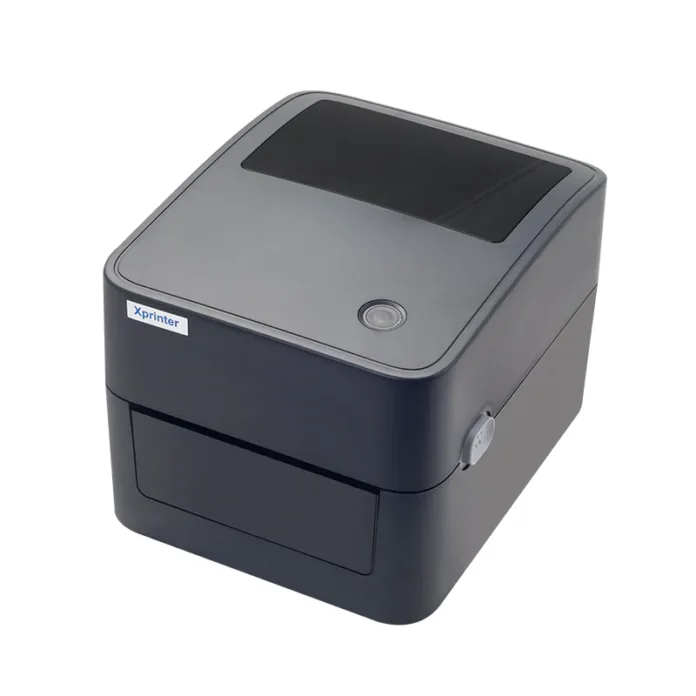

Restaurant POS systems need to handle transactions quickly while keeping order and payment information organized. Unlike many other retail environments, restaurants may process frequent orders during breakfast, lunch, dinner, and other busy periods. A dependable receipt printer can help staff complete transactions efficiently and provide customers with clear records of their purchases.
An Xprinter 80mm Thermal Printer can be suitable for restaurant POS systems when its specifications and connectivity options match the restaurant’s operational requirements. The 80mm paper format provides practical space for order or transaction details, while thermal printing supports fast receipt output without traditional ink cartridges. However, restaurants should evaluate compatibility, printing volume, connectivity, and workflow requirements before selecting a specific model.
Why 80mm Printers Work Well in Restaurants
Restaurant receipts can contain more information than a simple product list. Depending on the POS system, a receipt may include ordered items, quantities, prices, taxes, discounts, payment details, and order numbers.
An 80mm paper format provides enough width for many restaurant receipt layouts. It can help keep information readable while maintaining a practical receipt size for customers and staff.
Fast Receipt Printing During Busy Periods
Restaurants can experience significant increases in transaction volume during peak meal periods. Slow receipt printing can create unnecessary delays when employees are already handling multiple orders.
Thermal printing is designed for quick output, making it useful for environments where receipts need to be produced regularly. Faster printing can help staff complete transactions and move on to other customer-service tasks.
Compatibility With Restaurant POS Software
Compatibility should be one of the first considerations when choosing a receipt printer. The printer needs to communicate correctly with the restaurant’s POS software and the operating system running the POS terminal.
Before purchasing or installing a printer, restaurant operators should confirm that the specific model supports their POS platform. Driver availability and supported communication interfaces should also be reviewed.
Connectivity Options for Different Restaurant Setups
Restaurants can have different hardware arrangements depending on their size and workflow. A printer located next to a POS computer may use a USB connection, while a network-connected printer may use Ethernet.
Some compatible models may also offer wireless connectivity. The best option depends on the POS hardware, network configuration, printer location, and the restaurant’s preference for wired or wireless equipment.
Supporting Front-of-House Transactions
At the front counter, a receipt printer can help employees complete customer transactions efficiently. Once an order has been processed and payment is completed, the POS system can send the relevant information directly to the printer.
This reduces the need for manual receipt preparation and allows employees to maintain a consistent checkout process, even during busy periods.
Useful for Takeaway and Quick-Service Restaurants
Takeaway and quick-service businesses often depend on rapid transaction processing. Customers may expect their orders and payment transactions to be completed with minimal waiting.
An appropriately configured thermal printer can support this workflow by producing receipts quickly. Receipts can also provide useful order references that help employees and customers identify transactions.
Supporting Restaurant Order Information
Depending on how the POS system is configured, printed documents may include more than payment totals. They can contain order numbers, item details, special instructions, or other information required by the restaurant’s workflow.
The printer itself does not determine the information printed. The POS software and receipt templates control the content, so restaurants should verify that their software can produce the desired format.
Managing Thermal Paper
Restaurants that print many receipts need to maintain a reliable supply of compatible thermal paper. Running out of paper during a busy shift can interrupt normal operations.
Staff should know how to identify when a roll needs replacement and how to load a new roll correctly. Keeping spare rolls in an accessible location can help reduce downtime.
Easy Maintenance for Daily Use
Restaurant environments can be demanding, particularly around food preparation and service areas. Printers should be positioned where they are protected from spills, excessive moisture, grease, and unnecessary physical contact.
Routine cleaning and inspection can help maintain print quality and reduce problems caused by dust or debris. Maintenance should follow the printer manufacturer’s recommendations.
Considerations for High-Volume Restaurants
A printer that works well for a small café may not necessarily be the best choice for a high-volume restaurant. Businesses should consider their average and peak transaction volumes before selecting equipment.
Important factors include:
- Expected daily printing volume
- Printing speed
- POS compatibility
- Connection type
- Paper capacity
- Available counter space
- Ease of maintenance
- Support and replacement requirements
Matching the printer to the actual workload can help prevent performance issues.
What About Kitchen Printing?
Some restaurants use printers as part of kitchen workflows, but kitchen printing has different requirements from customer receipt printing. A printer placed near food preparation areas may need additional protection from heat, moisture, grease, and other environmental factors.
If the printer will be used for kitchen tickets rather than customer receipts, restaurant operators should confirm that the specific model is appropriate for that environment. The printer’s intended use and environmental specifications should be considered before installation.
Is It a Good Choice for Every Restaurant?
An Xprinter 80mm thermal printer can be a practical option for many restaurant POS setups, but there is no single printer that is ideal for every business.
A small café with one checkout station may have different needs from a busy restaurant with several terminals, networked printers, and kitchen order workflows. The right choice depends on the restaurant’s POS software, transaction volume, printer location, connectivity requirements, and operating environment.
Conclusion
An Xprinter 80mm thermal printer can be suitable for restaurant POS systems when the specific model is compatible with the restaurant’s software and operational requirements. Its practical paper width, fast thermal printing, and potential connectivity options can support efficient transaction processing in many restaurant environments.
Before choosing one, businesses should evaluate POS compatibility, expected printing volume, connection methods, paper requirements, and installation conditions. With the right configuration and routine maintenance, an appropriate 80mm thermal printer can become a useful part of a restaurant’s daily POS workflow.

