

Efficiency plays an important role in the success of modern businesses. Retail stores, supermarkets, restaurants, warehouses, and service providers handle numerous daily transactions that require accurate documentation and timely information processing. Printing receipts, product labels, shipping details, and order tickets quickly can help businesses maintain organized workflows and provide better customer service.
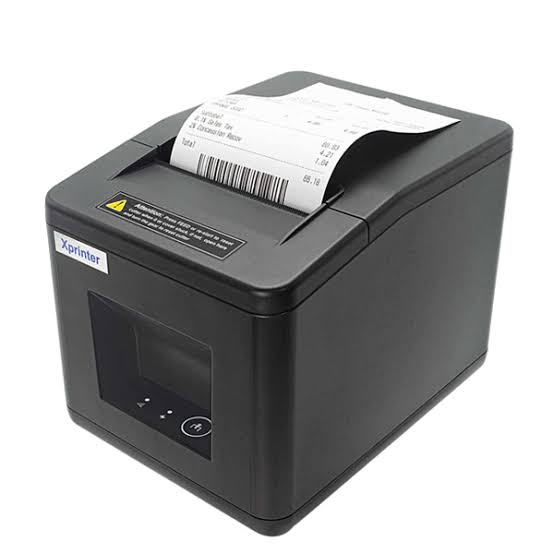
Thermal printing technology offers a practical solution to these operational demands. An Xprinter Thermal Printer can support different business activities by providing efficient receipt and label printing capabilities. When integrated into an appropriate business system, these devices can reduce manual work, simplify transaction processing, and help employees complete routine tasks more effectively.
The Role of Thermal Printers in Modern Business Operations
Thermal printers have become important tools in businesses that depend on frequent document and label printing. Unlike traditional inkjet printers, direct thermal models use heat-sensitive materials to create text, graphics, and barcodes without requiring ink cartridges or toner.
Their compact designs, fast output, and straightforward operation make them suitable for environments where printing speed and reliability matter. Businesses can use different thermal printer configurations for checkout counters, inventory departments, shipping stations, and mobile workstations.
By connecting printing equipment with point-of-sale (POS) software and inventory management systems, companies can automate several routine processes and improve coordination between departments.
How Xprinter Thermal Printers Improve Retail Efficiency
Retail operations involve multiple activities, including customer transactions, product identification, stock management, and sales documentation. Thermal printers can simplify these activities in several ways.
1. Faster Checkout Processes
Long checkout queues can negatively affect customer satisfaction, particularly during busy shopping periods. Fast receipt printing helps cashiers complete transactions without unnecessary delays.
Thermal receipt printers produce transaction records quickly, allowing employees to focus on scanning products, processing payments, and assisting customers.
For stores with high transaction volumes, selecting a printer with suitable printing speed and automatic cutting capabilities can further improve checkout efficiency.
2. Efficient Price Tag and Product Label Printing
Retail businesses frequently update product prices, promotional offers, and inventory information. Manually preparing product labels can consume considerable employee time.
Thermal label printers simplify this process by producing clear price tags, barcode stickers, and product identification labels. Employees can generate the required labels through compatible software rather than preparing them individually.
This approach is particularly useful for supermarkets, clothing stores, electronics retailers, and department stores.
3. Better Inventory Management
Accurate inventory records are essential for maintaining product availability and avoiding unnecessary stock discrepancies.
Thermal printers support inventory management by producing barcode labels that help employees identify products during receiving, storage, counting, and distribution.
When connected to an inventory management system, printed labels can help staff scan products and update stock information more consistently. This reduces dependence on manual identification and makes routine inventory activities easier to manage.
4. Improved Customer Service
Customers generally expect quick transactions and accurate purchase records. Printing clear receipts immediately after payment helps businesses provide transaction information without additional delays.
Thermal printers can also support customer service activities such as returns, exchanges, order confirmations, and payment documentation.
A smoother printing process allows employees to spend more time assisting customers rather than dealing with complicated printing procedures.
Applications in Different Business Environments
Thermal printing technology is not limited to traditional retail stores. Its flexibility makes it useful across several industries that require regular receipt, label, or ticket production.
Supermarkets and Grocery Stores
Supermarkets process numerous purchases throughout the day. Thermal receipt printers help cashiers produce transaction records quickly, while label printers support product pricing and inventory identification.
These devices can also assist with labeling packaged products and organizing promotional merchandise.
Restaurants and Food Service Businesses
Restaurants need efficient communication between ordering counters, service employees, and kitchen staff. Thermal printers can generate customer receipts, kitchen order tickets, takeaway labels, and delivery documentation.
For example, when an order is placed through a compatible POS system, the relevant information can be sent automatically to a designated kitchen printer. This helps employees prepare orders accurately and reduces the need for handwritten instructions.
Warehousing and Logistics
Warehouses handle products that move through receiving, storage, packaging, and shipping processes. Accurate identification is necessary to prevent misplaced goods and delivery errors.
Thermal label printers can produce shipping labels, barcode stickers, package identification tags, and inventory records. These printed materials make it easier for employees to track products throughout the distribution process.
Healthcare and Medical Facilities
Hospitals, laboratories, and pharmacies require organized documentation for patient services and medical supplies.
Thermal printers can produce patient identification labels, specimen labels, prescription information, and appointment tickets. Clear printed information supports identification procedures and helps staff maintain organized records.
Transportation and Ticketing Services
Transportation companies and ticketing facilities frequently need to print travel documents, parking tickets, boarding passes, and payment receipts.
Thermal printers offer a convenient way to produce these documents quickly, particularly at busy service counters and automated kiosks.
Reducing Operational Costs Through Thermal Printing
Managing operating expenses is an important consideration for businesses of every size. Printing-related costs include consumables, maintenance, replacement components, and employee time.
Thermal printing can help control some of these expenses.
Fewer Consumable Replacements
Direct thermal printers do not require ink cartridges or toner because they create images using heat-sensitive paper. This eliminates the need to purchase and replace certain traditional printing supplies.
Thermal transfer printers require ribbons, so businesses should consider their specific printing method when estimating ongoing expenses.
Lower Routine Maintenance Requirements
Traditional printers often require attention to ink systems, cartridges, and other components. Direct thermal printers have a simpler consumable structure, which can make routine maintenance easier.
Regular printhead cleaning, proper paper handling, and timely inspection remain important for maintaining reliable performance.
Improved Employee Productivity
Automating routine printing tasks can reduce the time employees spend preparing receipts and labels manually.
For example, instead of writing product information on individual stickers, employees can generate multiple barcode labels directly from inventory software. This allows staff to concentrate on other responsibilities.
The Importance of POS System Integration
A thermal printer delivers greater operational value when it works smoothly with existing business software.
Point-of-sale systems manage transactions, payment information, product details, and sales records. Connecting compatible thermal printers to these systems allows printing tasks to become part of the regular transaction workflow.
Several aspects should be considered when integrating printing equipment:
- Software compatibility: The printer should support the POS application and operating system used by the business.
- Connectivity: USB, Ethernet, Bluetooth, or Wi-Fi options should match the available infrastructure and intended working environment.
- Printing commands: Compatible printing protocols and drivers help ensure accurate communication between software and hardware.
- Multiple printer support: Larger businesses may need separate devices for receipts, kitchen orders, and product labels.
- Reliable data transmission: Stable connections help prevent interrupted printing and incomplete transaction records.
Proper integration reduces unnecessary manual steps and allows different departments to exchange information more efficiently.
Features That Contribute to Better Printing Performance
Selecting suitable printing equipment is essential for achieving consistent operational improvements. Businesses should evaluate several technical features before choosing a thermal printer.
Printing Speed
Printing speed determines how quickly a device can produce receipts or labels. High-volume retail counters may benefit from faster models that can handle frequent printing requests.
However, businesses should evaluate speed alongside print quality, workload, and the capabilities of their connected software.
Print Resolution
Resolution affects the clarity of text, graphics, and barcodes. A printer with suitable resolution helps ensure that important information remains readable and that printed barcodes can be scanned accurately.
Connectivity Options
Different businesses have different installation requirements. USB connections may be sufficient for individual checkout stations, while Ethernet and wireless interfaces can support more flexible workstation arrangements.
Paper and Label Compatibility
Businesses should check supported paper widths, label dimensions, roll capacities, and material types. Selecting compatible printing supplies helps prevent paper feeding problems and inconsistent output.
Durability and Reliability
Equipment used throughout the day should be capable of handling the expected workload. Businesses should review the manufacturer’s specifications, printhead life, cutter durability, and recommended operating conditions.
Practical Ways to Maximize Thermal Printer Efficiency
Installing a thermal printer is only one part of improving business productivity. Proper setup and regular maintenance are equally important.
Businesses can follow these practices to achieve better results:
- Choose equipment according to workload: Match printing speed, media capacity, and printer type with daily operational requirements.
- Organize printing stations: Position receipt printers near checkout counters and label printers close to inventory or packaging areas.
- Integrate compatible software: Connect printers with POS and inventory systems to reduce repetitive manual tasks.
- Train employees: Make sure staff understand paper loading, basic troubleshooting, and routine cleaning procedures.
- Use appropriate printing materials: Select compatible thermal paper and labels to maintain output quality.
- Schedule regular maintenance: Clean printheads, inspect rollers, and check connections to reduce unexpected interruptions.
These practices help businesses maintain consistent printing performance while minimizing avoidable workflow disruptions.
Choosing the Right Thermal Printer for Your Business
The most suitable thermal printer depends on the nature of the business and its daily printing activities.
Small retail stores may prioritize compact receipt printers that fit limited counter spaces. Supermarkets and larger outlets may require faster equipment with additional connectivity options to support multiple checkout stations.
Warehouses and logistics companies may benefit more from dedicated barcode and label printers, while restaurants often need reliable receipt and kitchen ticket printing solutions.
Before making a purchase, businesses should evaluate printing volume, media requirements, software compatibility, installation space, maintenance needs, and long-term operating costs.
Comparing these factors helps organizations select equipment that supports their existing processes without introducing unnecessary complexity.
Conclusion
Thermal printing technology can make a meaningful contribution to efficiency in retail and business operations. From speeding up checkout transactions to improving product identification and inventory management, these printers help simplify tasks that businesses perform every day.
Xprinter thermal printing solutions can serve different operational requirements across retail, hospitality, healthcare, warehousing, and logistics environments. By selecting suitable equipment, integrating it with compatible software, and maintaining it properly, businesses can improve workflow organization, reduce repetitive manual activities, and deliver more consistent customer service.
Ultimately, the value of thermal printing comes from matching the right technology with the specific needs of each business operation.

