
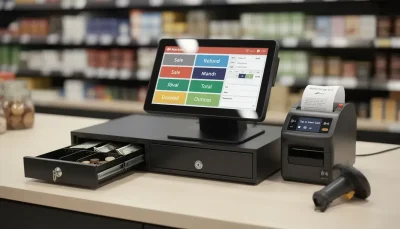

A retail POS system cash register is a vital part of daily business operations, helping retailers process transactions, manage inventory, and monitor sales performance. Like any essential business technology, it requires regular maintenance to ensure reliable performance, protect sensitive data, and minimize unexpected downtime. Proper care can also extend the lifespan of the system and improve overall efficiency.
Maintaining a POS system involves both hardware and software management. To better understand the features and components of a modern Retail POS System Cash Register, reviewing its capabilities can help businesses develop an effective maintenance routine.
Keep the Software Updated
Regular software updates are essential for maintaining system performance and security. Updates often include bug fixes, performance improvements, and compatibility enhancements for new payment technologies.
Keeping the software current also helps protect the system against known security vulnerabilities and ensures smooth daily operations.
Clean Hardware Regularly
Retail environments expose POS equipment to dust, spills, and frequent handling. Regular cleaning helps maintain reliable performance and extends the life of hardware components.
Pay attention to:
- Touchscreen displays
- Barcode scanners
- Receipt printers
- Payment terminals
- Cash drawers
- Customer-facing displays
Always use cleaning products that are appropriate for electronic equipment and follow the manufacturer’s recommendations.
Perform Routine Data Backups
Business data is one of the most valuable assets stored in a retail POS system. Regular backups help protect sales records, inventory information, and customer data from unexpected hardware failures or software issues.
Automatic backup schedules can reduce the risk of data loss and simplify recovery if problems occur.
Monitor Inventory Accuracy
A retail POS system cash register automatically updates inventory after each sale, but regular inventory checks are still important. Periodic stock counts help identify discrepancies and verify that inventory records remain accurate.
Maintaining accurate inventory supports better purchasing decisions and improves customer service.
Protect User Accounts
Employee accounts should be managed carefully to prevent unauthorized access. Each employee should have individual login credentials with access limited to the functions required for their role.
Good security practices include:
- Using strong passwords
- Updating passwords regularly
- Removing inactive user accounts
- Limiting administrative access
- Monitoring login activity
These measures help safeguard sensitive business information.
Inspect Peripheral Devices
The POS system relies on several connected devices to function efficiently. Regularly inspect hardware to ensure everything is operating correctly.
Check components such as:
- Barcode scanners
- Receipt printers
- Payment terminals
- Cash drawers
- Network connections
- Power supplies
Identifying potential issues early can prevent costly disruptions during business hours.
Test Payment Processing
Payment processing should be tested periodically to ensure transactions are completed accurately across all supported payment methods.
Businesses should verify that:
- Card readers function correctly
- Contactless payments work properly
- Digital wallet transactions process successfully
- Receipts are generated accurately
Routine testing helps maintain a smooth checkout experience for customers.
Review System Performance
Monitoring system performance helps identify slow response times, software errors, or hardware issues before they become serious problems.
Regular reviews of transaction speed, reporting functions, and overall system reliability can help businesses address concerns proactively.
Train Employees on Proper Usage
Even the best-maintained system can experience problems if it is not used correctly. Employees should receive ongoing training on operating procedures, security practices, and troubleshooting basic issues.
Well-trained staff can help prevent avoidable errors while improving operational efficiency.
Schedule Preventive Maintenance
Rather than waiting for equipment to fail, businesses should establish a preventive maintenance schedule. Routine inspections, software updates, and hardware servicing help reduce downtime and extend the lifespan of the retail POS system cash register.
A proactive maintenance approach supports consistent business operations and minimizes unexpected repair costs.
Conclusion
Proper maintenance is essential for keeping a retail POS system cash register operating efficiently and securely. Regular software updates, hardware cleaning, data backups, employee training, and routine equipment inspections all contribute to reliable performance and accurate business records. By following these best practices, retailers can reduce operational disruptions, improve customer service, and maximize the long-term value of their POS system.

