

Receipt printing remains an important part of daily operations for businesses that handle customer payments. Retail stores, restaurants, supermarkets, pharmacies, and service providers all rely on printed receipts to document purchases, confirm transactions, and provide customers with proof of payment. A dependable printing solution helps these businesses maintain organized checkout processes and reduce unnecessary interruptions.
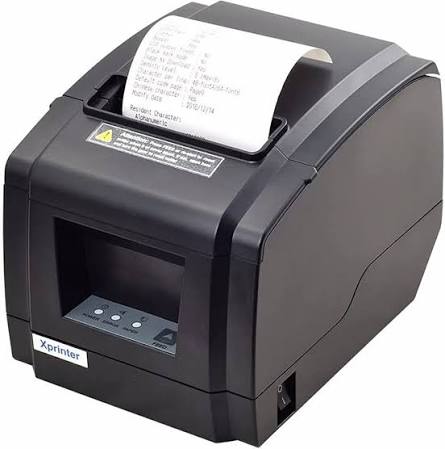
As transaction volumes increase, businesses often look for printers that combine consistent performance, practical connectivity, and manageable operating costs. An Xprinter Receipt Printer is one option businesses may consider when evaluating equipment for routine transaction processing. Understanding the features and practical considerations behind these devices can help organizations determine whether they suit their operational requirements.
The Importance of Reliable Receipt Printing
Receipt printers support several essential activities beyond producing purchase records. They help customers verify transaction details, assist employees with order processing, and provide documentation for returns or exchanges. In some industries, receipts also serve as references for accounting, inventory tracking, and internal reporting.
When a printer frequently experiences paper jams, connection problems, or inconsistent output, checkout operations can become slower. Reliable equipment helps reduce these interruptions and allows employees to focus on serving customers rather than resolving technical problems.
Practical Features for Everyday Business Operations
Businesses generally evaluate receipt printers according to how well their features support regular workloads. Several characteristics can influence their suitability for daily transactions.
Consistent Printing Performance
A receipt printer should produce clear, readable information throughout normal business hours. Consistent output helps ensure that product names, prices, tax details, payment information, and transaction totals are easy to understand.
For businesses with frequent customer transactions, dependable printing performance can also help maintain a steady checkout process during busy periods.
Suitable Printing Speed
Printing speed affects how quickly transaction records can be produced. In high-traffic environments, even small delays can accumulate when many customers are waiting to complete purchases.
Businesses should consider their average transaction volume and peak-hour demand when comparing printer specifications. A model with an appropriate printing speed can support smoother workflows without requiring unnecessary investment in equipment designed for much larger workloads.
Compact and Practical Design
Counter space is valuable in many retail and hospitality environments. Compact receipt printers can fit into checkout areas where space is limited, leaving room for payment terminals, barcode scanners, and other equipment.
A practical design can also make installation and routine operation more convenient for employees.
Connectivity and System Compatibility
Modern checkout environments often include several connected devices, including computers, point-of-sale terminals, cash drawers, and payment systems. Receipt printers must communicate effectively with the equipment and software already used by a business.
Common connectivity options include USB, Ethernet, serial connections, and wireless interfaces, depending on the model. USB connections are frequently used for direct connections to individual computers or POS terminals, while Ethernet can support network-based printing arrangements.
Before selecting a printer, businesses should verify its supported interfaces and compatibility with their operating systems and POS software. Checking driver availability, connection requirements, and supported command languages can help prevent installation difficulties.
Applications Across Different Business Sectors
Receipt printers are used in many industries because transaction documentation is a routine operational requirement.
Retail Stores and Supermarkets
Retail businesses use receipt printers to generate purchase summaries containing product descriptions, quantities, prices, discounts, and taxes. These records help customers review purchases and provide useful references for exchanges, refunds, and customer service.
Supermarkets may require printers capable of handling frequent transactions throughout the day. Print speed and consistent operation are therefore important considerations.
Restaurants and Cafés
Restaurants use printers to produce customer bills, payment receipts, and other transaction records. Depending on the POS configuration, printing equipment may also support order-related workflows.
In busy cafés and food-service businesses, reliable printing helps employees complete payment procedures efficiently and maintain organized records.
Pharmacies and Healthcare Retail
Pharmacies often provide receipts containing product information, quantities, pricing, and payment details. Clear printed records can help customers review purchases and support routine administrative procedures.
Businesses in this sector should also consider their software requirements and any applicable rules governing transaction documentation and customer information.
Service Businesses
Salons, repair shops, ticket counters, and other service providers use receipts to confirm completed payments. Printed records can help employees organize daily transactions and provide customers with documentation when needed.
Managing Operating Costs and Maintenance
The purchase price is only one part of the total cost of operating a receipt printer. Businesses should also evaluate consumables, maintenance requirements, replacement parts, and expected equipment lifespan.
Thermal receipt printers are commonly used in POS environments because they print using heat-sensitive paper rather than ink cartridges or ribbons. This technology can simplify routine supply management, although businesses still need to purchase compatible thermal paper and maintain the printing mechanism.
Regular maintenance can help preserve print quality and reduce avoidable equipment problems. Basic practices include:
- Cleaning the print head according to the manufacturer’s instructions.
- Removing paper dust and debris from the paper path.
- Using compatible receipt paper with suitable dimensions.
- Checking cables and connectors for damage.
- Keeping firmware and drivers updated when applicable.
- Following recommended procedures when replacing paper rolls.
These steps can help maintain consistent output and reduce disruptions caused by neglected equipment.
Factors to Evaluate Before Choosing a Model
Not every business has the same transaction volume, workspace, or technical setup. Selecting an appropriate receipt printer requires an assessment of the environment in which it will operate.
Important factors include:
- Daily transaction volume: Estimate the number of receipts printed during normal and peak business hours.
- Printing specifications: Review print speed, resolution, paper width, and supported media.
- Connectivity: Choose interfaces that match the existing POS hardware and network.
- Software compatibility: Confirm that the printer works with the business’s operating system and POS application.
- Physical requirements: Consider available counter space, installation position, and ease of paper replacement.
- Maintenance needs: Review cleaning procedures, consumable availability, and technical support options.
- Long-term costs: Compare the initial price with paper expenses, maintenance, and potential replacement costs.
Evaluating these factors helps businesses avoid selecting equipment based only on its purchase price or advertised specifications.
The Role of Receipt Printers in Customer Experience
The checkout process is often one of the final interactions customers have with a business. A slow or unreliable transaction process can create frustration, particularly during busy periods. Efficient receipt printing helps employees complete payments and provide transaction records without unnecessary delays.
Readable receipts also contribute to a more organized customer experience. Customers can use them to check purchase details, review totals, and retain proof of payment. For businesses, accurate transaction documentation supports customer service and routine recordkeeping.
Adapting to Changing Transaction Requirements
Business payment environments continue to evolve as organizations adopt integrated POS systems, mobile payment solutions, and network-based management tools. Receipt printers must therefore work effectively with both existing equipment and future technology plans.
Some businesses may prioritize compact printers for individual checkout stations, while others may need network connectivity for multiple terminals. Organizations should assess whether a selected model can accommodate their expected operational changes and whether the manufacturer provides relevant documentation, drivers, and technical assistance.
It is also useful to consider how printed receipts fit into broader digital recordkeeping practices. Electronic receipts and cloud-based transaction systems may reduce paper use in some situations, but printed records remain relevant in many customer-facing environments.
Conclusion
Businesses consider receipt printers for daily transactions based on several practical requirements, including reliable output, appropriate printing speed, system compatibility, connectivity, and maintenance needs. The right equipment can help support efficient checkout operations, organized transaction records, and a consistent customer experience.
An Xprinter receipt printer may be worth evaluating as part of a broader POS equipment selection process. By comparing individual model specifications with transaction volume, software requirements, workspace limitations, and long-term operating costs, businesses can make a more informed decision about the receipt printing solution that best supports their daily activities.

