
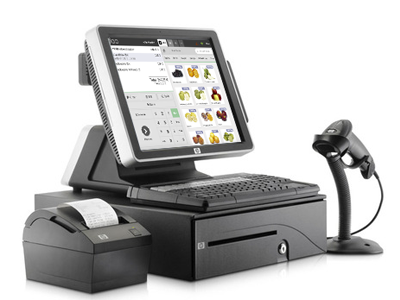

Choosing the right POS hardware manufacturer can have a long-term impact on a business’s checkout operations. Reliable equipment supports daily transactions, employee productivity, and customer service, while poorly matched hardware can lead to compatibility issues and unexpected interruptions.
Businesses should therefore look beyond product appearance or initial pricing when comparing manufacturers. Reviewing established options such as POS Hardware Manufacturer can help decision-makers understand what to evaluate when selecting equipment for a complete POS environment.
Start With Your Business Requirements
The first step is to identify what the business actually needs from its POS hardware. A small retail shop, busy restaurant, and multi-location retailer may have very different requirements.
Consider transaction volume, number of checkout stations, available workspace, payment methods, inventory needs, and the types of peripherals employees will use. Clear requirements make it easier to compare manufacturers objectively.
Evaluate the Product Range
A reliable manufacturer should offer hardware that can support different aspects of the POS environment. Depending on the business, this may include:
- POS terminals
- Touchscreen displays
- Barcode scanners
- Receipt printers
- Cash drawers
- Payment devices
- Customer displays
- Additional POS peripherals
A broad product range can make it easier to build a coordinated system rather than sourcing every component from unrelated suppliers.
Check Hardware Compatibility
Compatibility is one of the most important considerations when selecting POS equipment. Hardware needs to communicate properly with the POS software and other connected peripherals.
Before purchasing, businesses should check supported operating systems, connection types, software requirements, drivers, and integration capabilities. This can reduce the risk of discovering compatibility problems after installation.
Consider Build Quality
POS equipment is frequently used throughout the working day. Terminals, printers, scanners, and other components may be exposed to repeated handling and demanding operating conditions.
Businesses should look for hardware designed for commercial environments. Factors such as construction quality, component durability, and expected operating life can be more important than cosmetic features.
Review Technical Specifications
Specifications provide useful information about how equipment may perform in real-world use. Depending on the product, businesses may need to review processing capability, screen resolution, memory, storage, ports, connectivity, and peripheral support.
The goal is not necessarily to select the highest specification available. Instead, businesses should choose equipment that provides appropriate performance for their actual workload.
Assess Integration Capabilities
A POS system typically involves multiple connected components. The terminal may need to communicate with scanners, receipt printers, payment devices, cash drawers, or customer displays.
A manufacturer with strong integration capabilities can make it easier to create a coordinated hardware environment. Businesses should determine how different components are expected to connect and operate before making a decision.
Look at Support and Maintenance
Even reliable equipment may occasionally require troubleshooting or maintenance. Technical support can therefore be an important part of the overall manufacturer relationship.
Businesses should ask about support channels, troubleshooting assistance, warranty coverage, replacement procedures, and maintenance services. Clear support arrangements can make hardware issues easier to manage when they occur.
Examine Warranty Terms
Warranty coverage provides an additional layer of protection for a technology investment. However, warranty terms can vary significantly between manufacturers.
Review the duration of coverage, eligible components, exclusions, repair procedures, and replacement policies. Understanding these details before purchasing can prevent misunderstandings later.
Think About Scalability
A POS setup that works today may need to expand as the business grows. New locations, additional employees, higher transaction volumes, or expanded product lines can create new hardware requirements.
Manufacturers that provide scalable equipment can make future expansion more manageable. Businesses should consider whether additional terminals and peripherals can be integrated without replacing the entire system.
Compare Total Ownership Costs
Purchase price is only one part of the cost of POS hardware. Businesses should also consider installation, configuration, maintenance, replacements, software compatibility, and potential upgrades.
A slightly higher initial investment may provide better long-term value if the equipment is durable, compatible, and easier to maintain. Comparing total ownership costs provides a more realistic basis for decision-making.
Consider Security Requirements
POS hardware operates in an environment where transaction and business information must be handled carefully. Businesses should evaluate security features and determine whether the equipment supports appropriate access controls and payment-related requirements.
Security should also be considered at the software and network levels. Hardware is only one part of a broader POS security strategy.
Ask the Manufacturer the Right Questions
Before placing an order, businesses can ask manufacturers questions such as:
- Which POS software platforms are supported?
- What peripherals can be integrated with the equipment?
- What connectivity options are available?
- How is technical support provided?
- What does the warranty cover?
- Are replacement components available?
- Can the hardware support future expansion?
- What installation or configuration assistance is offered?
The answers can reveal whether a manufacturer is prepared to support the business beyond the initial sale.
Avoid Choosing Based on Price Alone
Cost is naturally important, but the cheapest option may not always be the most practical. Hardware that requires frequent replacement or creates compatibility problems can become more expensive over time.
Instead of focusing only on the initial price, businesses should compare reliability, support, compatibility, scalability, and expected lifespan alongside cost.
Make a Long-Term Decision
Selecting a POS hardware manufacturer is ultimately about finding a suitable technology partner for the business’s operational needs. Reliable equipment, compatible components, responsive support, and flexible solutions can all contribute to a more dependable POS environment.
By defining requirements, evaluating product quality, checking compatibility, reviewing support policies, and considering future growth, businesses can make a more informed choice. A careful evaluation process can help ensure that the selected POS hardware remains useful and practical as daily operations evolve.

